Tech StudioCoffee LabSwitch between Simon's Tech Studio and Coffee Lab.
Loading projects…
Bean Relay E-commerce | Case Study | Simon Mwangi
SAAS
Bean Relay E-commerce
Sell coffee, accept payments, and manage repeat orders from one connected platform.
Date
Jun 2024
Category
SAAS
Case study
The story behind Bean Relay E-commerce
BeanRelay — Coffee Commerce & Subscriptions
Connecting coffee discovery, payments, and repeat deliveries through one checkout.
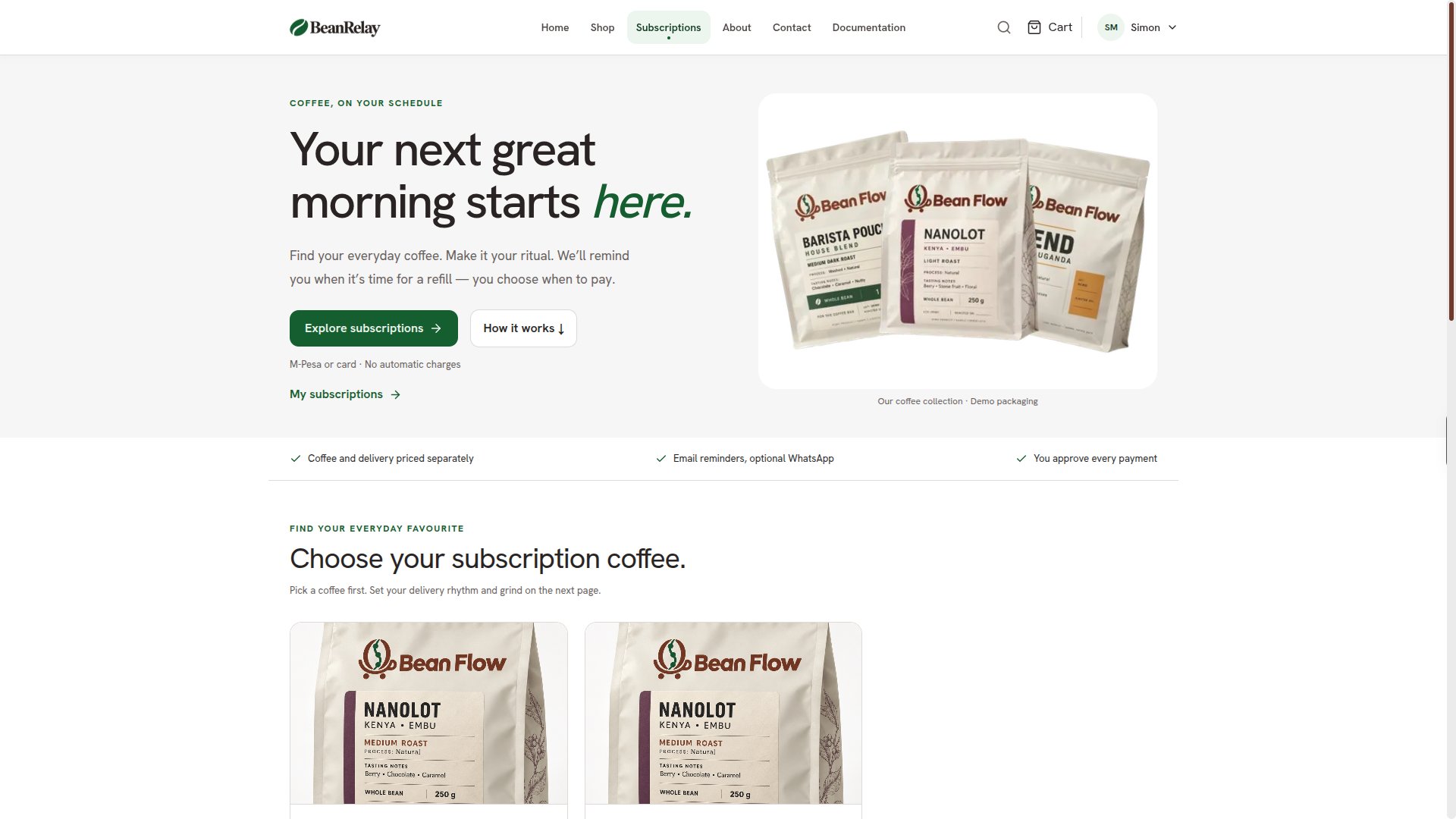
BeanRelay is a coffee e-commerce platform I’m building for roasters and coffee businesses that need a connected way to sell coffee, accept payments, and manage repeat and wholesale orders. It’s a Progressive Web App that customers can install from their browser. It combines a Next.js storefront with a modular NestJS backend, supporting mobile-money and card payments (M-Pesa STK push and Stripe), customer-approved subscription renewals, and wholesale invoicing.
The challenge
Choosing coffee involves more than selecting a product. Customers need to understand bag sizes, roast levels, grind options, and delivery schedules before committing to a purchase.
Behind the storefront, the business needs clarity too. A submitted payment request is not necessarily a confirmed order. Delayed responses, unsuccessful payments, and unpaid subscription renewals all need a clear next action. Café and wholesale buyers add another layer: custom orders, invoices, and receipts.
The challenge was to connect these decisions into a buying experience that customers could follow and a backend workflow the business could manage.
My role
I work across product design, frontend development, backend architecture, data modelling, payment integration, and documentation.
The project evolved from an existing coffee-storefront codebase into a broader commerce product. My background as both a coffee roaster and software engineer helped me identify which coffee details belong in the buying journey — and which information can wait until the customer needs it.
What I built
Coffee discovery and variant selection
The catalogue presents product imagery, tasting notes, roast information, and available sizes. Customers can compare offers and select the variant they want before entering checkout.
Normal purchases and subscription deliveries use the same address-book interface, order summary, and payment components. Subscription payments use their own delivery order, keeping them separate from unrelated items in the customer’s cart.
Mobile-money and card payments
The platform integrates M-Pesa STK push (the prompt a customer approves on their phone) and Stripe payments, with interfaces for pending responses, recoverable errors, and payment-status checks. The payment-review work gives uncertain transactions a path to resolution instead of immediately asking the customer to pay again.
Payment states that mean something
Every order is pending, paid, or paused. Provider prompts and customer reports are treated as signals; the saved order and a server-verified provider result are what confirm a payment. A paused subscription is waiting for the customer’s next approval.
Customer-approved coffee subscriptions
Customers first choose a subscription coffee, then configure an available delivery schedule and grind. A live summary keeps their selection visible before they continue to checkout.
Coffee and delivery charges are presented separately. Each renewal requires payment approval, and subscription management lives on a dedicated My subscriptions page.
Wholesale orders, invoices, and receipts
Café and wholesale customers can request custom orders, pay an invoice, and follow roaster approval. Store teams can attach payment receipts as private evidence and resolve payment reviews before an order progresses.
Notifications by email and WhatsApp
Customers and store teams choose email or WhatsApp updates, with background workers handling delivery.
Authentication that preserves progress
The sign-in flow retains a validated local return URL, including checkout parameters. Customers can authenticate and continue from their selected plan instead of being sent back to the homepage.
An installable web app
Customers can install BeanRelay from the browser and open it like an app, without going through an app store.
Documentation
BeanRelay ships with store guides for the people running a coffee business, a developer quickstart, references for authentication, checkout, and webhooks, and an API reference. Each route is labelled published or source-defined, so developers know what’s deployed before they connect a storefront.
Engineering decisions
I organised the NestJS backend around catalogue, orders, payments, notifications, and subscriptions, using TypeORM and PostgreSQL for persistence and Redis with BullMQ for background work.
On the frontend, reusable Next.js components share the existing Tailwind theme. React Hook Form handles forms, RTK Query manages API requests, and Zustand supports local workflow state where needed.
The aim is to support different storefront designs against a consistent commerce API. Tenant-aware company accounts, team access, and SaaS plans form the next stage of that product direction.
The result so far
BeanRelay now has a clearer journey from choosing coffee to configuring repeat deliveries and entering checkout. Payment exceptions and subscription management have defined places in that journey.
The product remains in active development. Targeted automated checks cover checkout behaviour, subscription selection, and authentication return paths; live payment and operational validation continue alongside that work.
What I learned
The hardest problems often sit between features: preserving a selected plan through sign-in, distinguishing a pending payment from a paid delivery, and reusing checkout without mixing different order types.
Those connections shape how I build commerce software: the interface should explain what happens next, and the backend should support that promise when requests are delayed or fail.
Building a storefront, integrating payments, or developing an API-led product? Let’s discuss your project.